Generate Professional Looking AI Video Shoot For Products
Oct 28, 2025
@madaigens
In this blog you will get to know a simple step by step workflow on how to leverage AI to create Aesthetic and Professional looking videos step by step. From Image generation AI workflow to Image editing AI to many more steps required in creating a Professional looking AI video advertisement of a product.
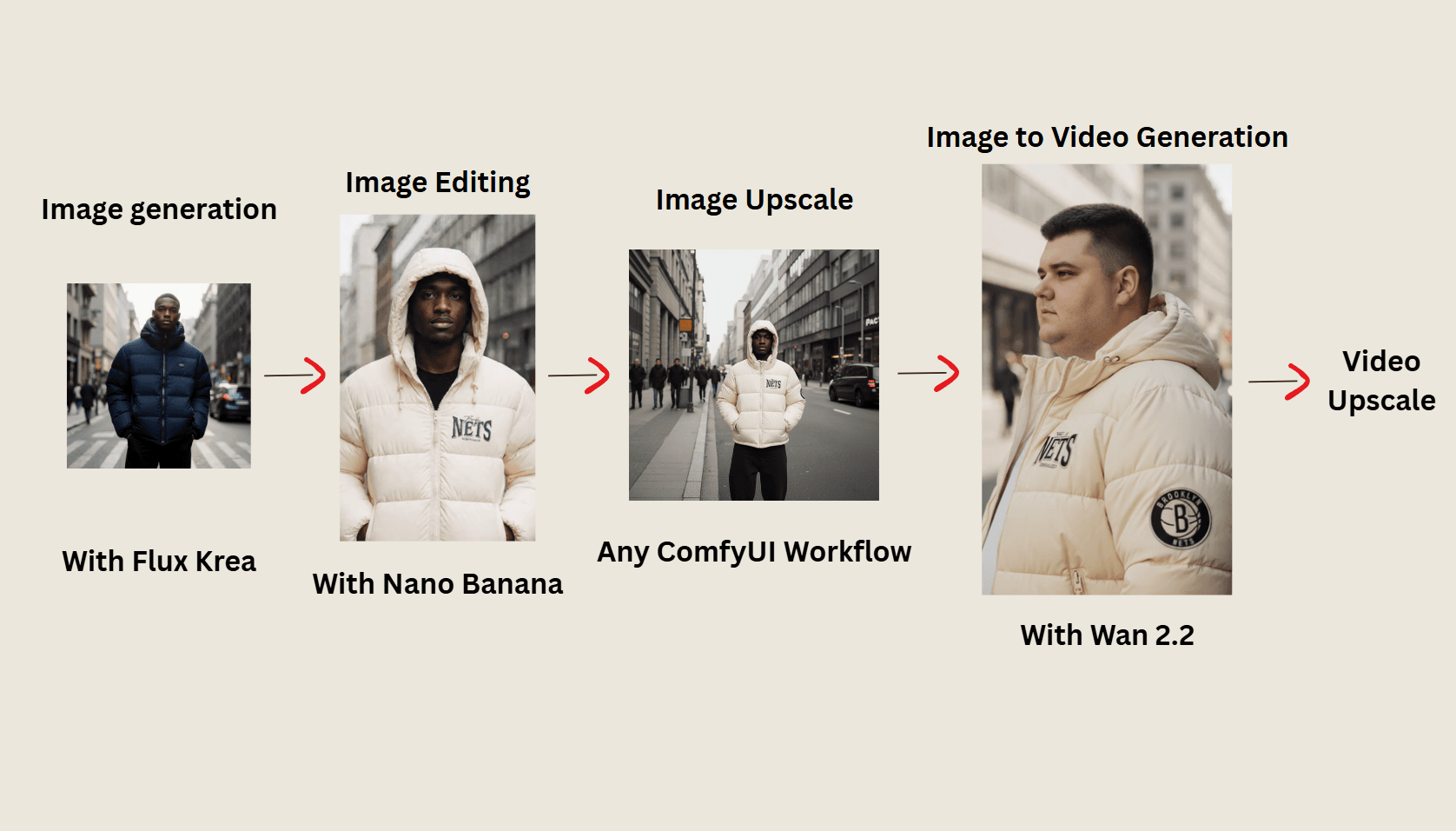
Image Generation
Flux Krea
I use flux krea for its human realism and it is especially trained for human realistic and photoshoot images.
Image Editing
Nano Banana
Nano banana is still the best option for Image editing. There are more options such as Seedream v4 but Nano Banana is tops the chart.You can access Nano Banana on googleAIStudio.
Image Upscale.
Use any upscaling AI model to upscale the images before using them in Image to video generation.
Image To Video Generation.
Wan 2.2 is the best open source Video generation model to the date. Use Wan 2.2 in comfyUI for unlimited free video generations.
You can generate upto 720p videos with a maximum of 24 fps with Wan 2.2.
Link to use Wan 2.2 in comfyUI Here.
Video Upscale and Interpolation.
Upscale frames of video to HD quality (comfyUI workflow link) and increase the frames from 24fps to 50fps using frame interpolation.
You will find free comfyUI workflows for frame interpolation.
Check out our comparisons on image and video generative AI tools like Leonardo AI, Ideogram etc. with results and analysis over each AI tool, Or just judge them yourself by comparing the results of each ai tool, go to home now!.
Generate Professional Looking AI Video Shoot For Products
Oct 28, 2025
@madaigens
In this blog you will get to know a simple step by step workflow on how to leverage AI to create Aesthetic and Professional looking videos step by step. From Image generation AI workflow to Image editing AI to many more steps required in creating a Professional looking AI video advertisement of a product.
Image Generation
Flux Krea
I use flux krea for its human realism and it is especially trained for human realistic and photoshoot images.
Image Editing
Nano Banana
Nano banana is still the best option for Image editing. There are more options such as Seedream v4 but Nano Banana is tops the chart.You can access Nano Banana on googleAIStudio.
Image Upscale.
Use any upscaling AI model to upscale the images before using them in Image to video generation.
Image To Video Generation.
Wan 2.2 is the best open source Video generation model to the date. Use Wan 2.2 in comfyUI for unlimited free video generations.
You can generate upto 720p videos with a maximum of 24 fps with Wan 2.2.
Link to use Wan 2.2 in comfyUI Here.
Video Upscale and Interpolation.
Upscale frames of video to HD quality (comfyUI workflow link) and increase the frames from 24fps to 50fps using frame interpolation.
You will find free comfyUI workflows for frame interpolation.
Check out our comparisons on image and video generative AI tools like Leonardo AI, Ideogram etc. with results and analysis over each AI tool, Or just judge them yourself by comparing the results of each ai tool, go to home now!.
Generate Professional Looking AI Video Shoot For Products
Oct 28, 2025
@madaigens
In this blog you will get to know a simple step by step workflow on how to leverage AI to create Aesthetic and Professional looking videos step by step. From Image generation AI workflow to Image editing AI to many more steps required in creating a Professional looking AI video advertisement of a product.
Image Generation
Flux Krea
I use flux krea for its human realism and it is especially trained for human realistic and photoshoot images.
Image Editing
Nano Banana
Nano banana is still the best option for Image editing. There are more options such as Seedream v4 but Nano Banana is tops the chart.You can access Nano Banana on googleAIStudio.
Image Upscale.
Use any upscaling AI model to upscale the images before using them in Image to video generation.
Image To Video Generation.
Wan 2.2 is the best open source Video generation model to the date. Use Wan 2.2 in comfyUI for unlimited free video generations.
You can generate upto 720p videos with a maximum of 24 fps with Wan 2.2.
Link to use Wan 2.2 in comfyUI Here.
Video Upscale and Interpolation.
Upscale frames of video to HD quality (comfyUI workflow link) and increase the frames from 24fps to 50fps using frame interpolation.
You will find free comfyUI workflows for frame interpolation.
Check out our comparisons on image and video generative AI tools like Leonardo AI, Ideogram etc. with results and analysis over each AI tool, Or just judge them yourself by comparing the results of each ai tool, go to home now!.